
How a Change to One Part of a PHP Website Can Affect Other Pages
One edit can change more than one page on a PHP website. Learn how to trace shared files, test their callers and avoid surprises.
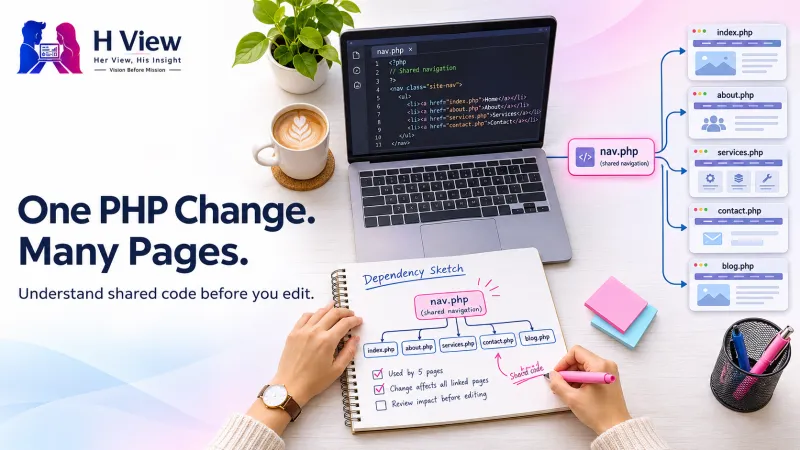
A PHP website can look like a collection of separate pages while running on a much smaller collection of shared files. The homepage, contact page and product catalogue may all load the same navigation, configuration and helper functions. An edit to one of those files can change all three pages, even if you only opened the editor to fix one of them. Before changing a file, find out who uses it and what those callers expect.
What does “shared code” mean on a PHP website?
Suppose a business website has a home page, a pricing page and a contact page. Each page has different content, but the top navigation is identical. Instead of maintaining three copies of the menu, a developer can put it in one file and load it from each page. When the business changes its phone number or adds a menu link, one edit can update all three pages consistently.
The same approach is used for code visitors never see. A shared file may create a database connection, load environment settings, start a session, or provide a function that formats a price. Reuse saves work and reduces inconsistencies. It also means the file has several callers, and each of those callers can be affected by a change in its behaviour.
How do PHP includes connect pages?
PHP can evaluate one file inside another with include or require. Both can bring in template output or code. If the file is missing, include emits a warning, while require raises an error. The _once variants are useful when a file should be loaded only once during a request. The PHP include documentation also explains how included code can see variables in the scope where it is loaded.
That scope can hide a dependency. A template may assume a variable called $pageTitle was set earlier. The homepage might always set it, while a landing page never did because the old template provided a default. Removing that default can produce a warning on the landing page, even though the homepage still looks right. If a template needs a value, make that requirement clear and decide what it should do when the value is absent.
 Also readWhat Is a PHP Version Update, and Why Does It Matter for an Existing Website?→
Which edits usually have the widest impact?
| Shared component | Possible impact | What to test |
|---|---|---|
| Header or footer | Navigation, metadata or scripts change on several pages | Desktop and mobile navigation, page titles, and scripts on different templates |
| Database bootstrap | Any page or job that opens a database connection can fail | Read a record, submit a form on staging, and run a relevant scheduled job |
| Formatting helper | Values change on screens, emails or exports | Check one ordinary value, one empty value and one edge case in every output format |
| Session or permissions logic | Sign-in, redirects or restricted pages behave differently | Compare logged-out, signed-in and permitted user flows with test accounts |
A practical example: a price change reaches an invoice
Imagine a small shop that wants catalogue cards to show round prices. The developer edits a shared helper to remove decimal places. The cards look right in the browser. Later, the team finds that a confirmation email and an invoice call the same helper. They now display a rounded amount even when the stored total includes paise. The amount collected may still be correct, but the customer sees a different amount in the message.
A safer fix is to keep the existing formatting for emails and invoices and give the catalogue its own display option. That way the change can be verified in one place without changing the meaning of a helper that other parts of the site rely on. The example is also a reminder to check what goes out of the site. A browser preview alone would never show the effect on an invoice or an email.
How do you check what might break before editing?
Start with the page where the change was requested and trace the template, helper or configuration file that actually controls it. Search the codebase for the filename and any function you intend to change. Look beyond public pages: check form handlers, command-line jobs, email templates and exports. If a framework resolves templates or services dynamically, a filename search may miss callers; follow the route or service configuration as well.
Next, describe what must stay the same. If you are changing a menu, existing links must still work. If you are changing a helper, write down the inputs it accepts and the outputs that callers expect. Make a narrow change on staging, keep a way to restore the previous version, and test one example of each affected page or action. For a database or configuration edit, confirm whether restoring the code alone would be enough.
What should you check if pages already broke?
Record the first failing URL or action and the time it failed. Compare it with a working page and look at the server logs around that timestamp. A missing include path, undefined function or configuration mismatch may point directly to the shared dependency. A PHP syntax check can catch parsing errors, but a file can pass that check and still fail when it receives a value you did not expect.
If the failure affects a checkout, login or enquiry form, use your rollback plan to restore the working flow while you reproduce the problem on staging. Avoid showing debug errors on the public site; logs can reveal the cause without exposing file paths or configuration to visitors. Then test the exact task that failed, from the first click through to its final result.
 Also readHow a PHP Website Talks to Its Database, and Why the Connection Can Fail→
Her View
When someone asks for a small website edit, ask which screen or task should change. The request may be small in business terms but touch a file used in several places. A quick conversation about where the change belongs is cheaper than discovering a surprise in an invoice or customer email.
His Insight
Treat the inputs and outputs of shared code as promises to its callers. If one page needs a different result, give that page an explicit option or its own presentation function. A clear boundary makes the next change easier to test and gives the team a better idea of what might break.
H View Verdict
Shared PHP code is useful because one good change can reach many pages. The best safeguard is to know exactly which pages should inherit it. If you need help tracing an existing site before editing it, explore H View’s PHP development services.
Frequently asked questions
Can a footer edit break a contact form?
Yes, if the footer loads a script the form depends on. Test submitting the form and receiving the expected result; seeing the form on screen is only the first check.
Does every PHP file affect every page?
No. It affects the requests that load it directly or through another dependency. Use the code and route configuration to trace which requests those are.
Should I copy the shared file to make a one-page change?
Usually an explicit option or smaller template change is easier to maintain. A full copy can drift over time and leave future fixes applied to only one version.
H View stories follow our editorial policy. Spotted an error? Tell us and we will correct it.
Rate this article
One tap is enough. No comment needed.
Was this article helpful?
Your answer goes straight to our editors.








Comments0
No comments yet. Start the conversation.