
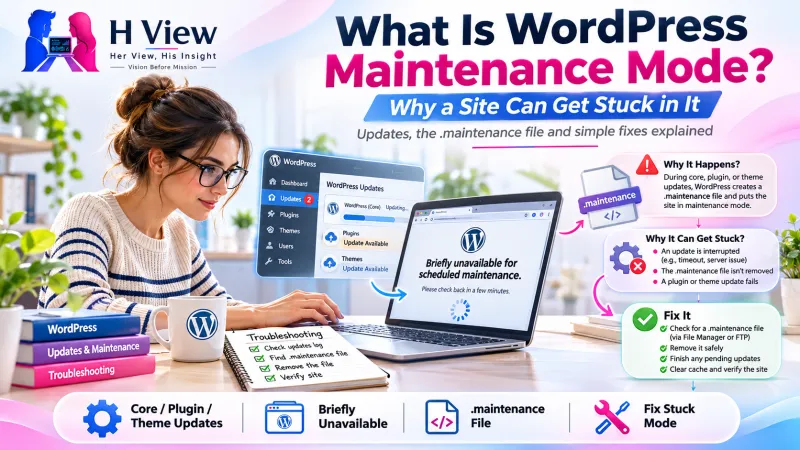
What Is WordPress Maintenance Mode, and Why Can a Site Get Stuck in It?
"Briefly unavailable for scheduled maintenance" is WordPress protecting your site while it updates. Why the message appears, why it can stay too long and how to plan updates so it does not.
WordPress maintenance mode is a short pause WordPress puts on your site while it updates core files, plugins or themes. During that time visitors see "Briefly unavailable for scheduled maintenance. Check back in a minute." It normally lasts seconds, but if an update is interrupted the site can stay stuck showing that message.
The message itself is not an error. It is WordPress protecting visitors from seeing a half-updated site. The problem only begins when the pause does not end.
Why does WordPress go into maintenance mode?
Updating replaces many files. If a visitor loaded a page while half the files were old and half were new, they might see errors or a broken layout. To avoid that, WordPress creates a small temporary file called .maintenance in the site's main folder when an update starts. While that file exists, WordPress shows the maintenance message instead of the site. When the update finishes, WordPress deletes the file and the site returns. WordPress's wp_maintenance() function reference describes this check.
Why can a site get stuck?
As hosting provider WP Engine explains in its support note, if an update is not successful or WordPress cannot remove the .maintenance file, the message can remain. Common reasons include:
| What happened | Why it leaves the site stuck |
|---|---|
| The browser tab was closed mid-update | The update process stopped before it could clean up |
| Server timeout or low memory | The host stopped the update script before it finished |
| Many plugins updated at once | A larger batch has more chances to fail part-way |
| A plugin or theme conflict in the new version | The update ran, but the site cannot load properly afterwards |
| Caching | A cached copy of the maintenance page is still being served |
 Also readWhy Does a WordPress Login Page Keep Redirecting? How Logins, Cookies and Site URLs Work→
Why is a stuck update worth checking carefully?
Removing the leftover file usually brings the site back, but it does not tell you whether the update itself completed. A plugin may now be half-updated, which can cause errors later. A careful check confirms which updates finished, whether the site works for visitors and in the admin area, and whether anything needs to be reinstalled or rolled back from a backup.
How can updates be planned to avoid this?
- Take a backup first that you know how to restore.
- Update a few items at a time rather than everything at once.
- Keep the browser tab open until WordPress confirms the update has finished.
- Test on a staging copy for important sites, especially shops and booking sites.
- Update during quieter hours so any pause affects fewer visitors.
- Check the site as a visitor afterwards, including forms, checkout and key pages.
Her View / His Insight
Her View: Seeing a maintenance message on your own site is stressful, but it usually means WordPress was trying to protect your visitors. Take a breath before making changes.
His Insight: The real lesson is the update routine. Backups, small batches and a quick check afterwards prevent most stuck-update incidents.
Frequently asked questions
Is my site hacked if it shows this message?
Very unlikely. This is a standard WordPress message tied to updates. If you also see unfamiliar content or redirects, ask for a security review.
How long should maintenance mode last?
Usually only a few seconds to a minute during an update. If it lasts much longer, the update probably did not finish cleanly.
Can I show a custom maintenance page?
Yes. Many plugins let you show a branded "we'll be back soon" page while you work, which is separate from the automatic update message.
Site stuck after an update?
HView's Digital Solutions team can check what completed, restore safely and plan a regular website care routine.
References

H View stories follow our editorial policy. Spotted an error? Tell us and we will correct it.
Rate this article
One tap is enough. No comment needed.
Was this article helpful?
Your answer goes straight to our editors.








Comments0
No comments yet. Start the conversation.